Three sessions, one clock
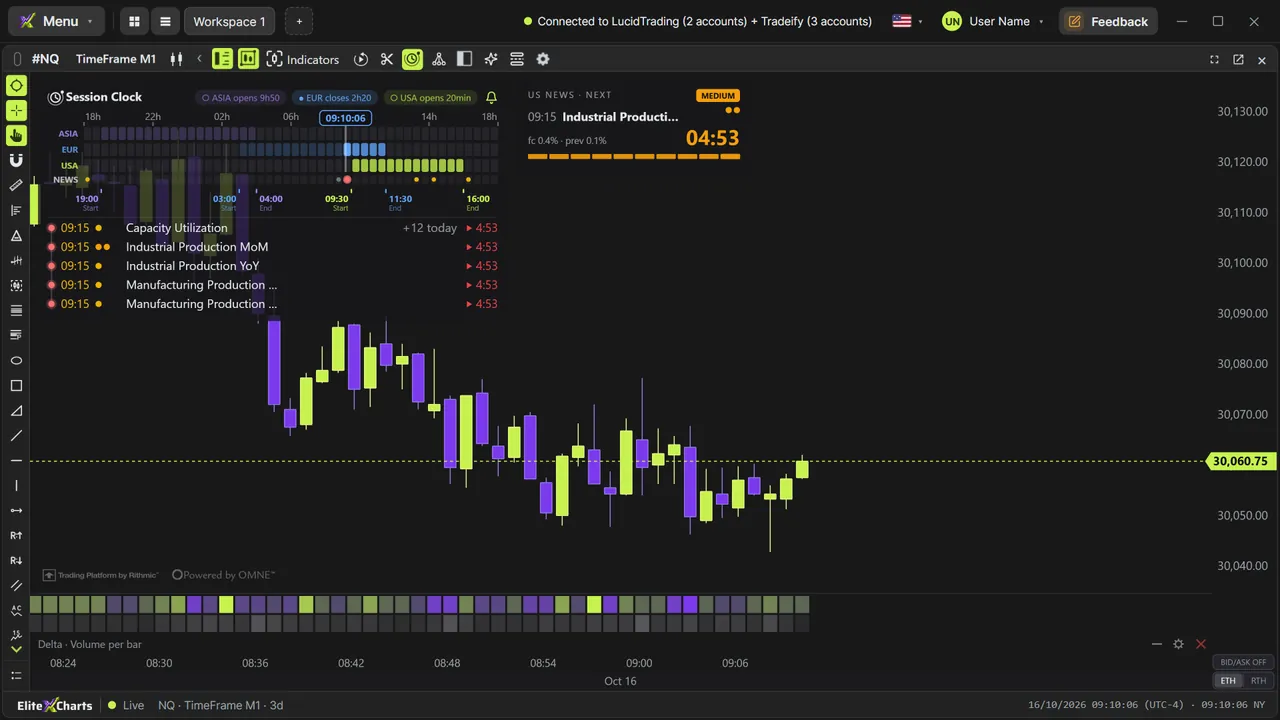
Asia, Europe and US on the Globex day in 30-minute blocks. Overlaps show up by vertical alignment; the past dims, the current block glows, and the ET time runs with seconds.
Session Clock + Economic Calendar
Every trader has been caught positioned when a red-folder number dropped, with the calendar sitting in another tab. Here it lives on the chart: the three sessions on one clock, today's US releases with impact and forecast, a countdown to the next one and a sound alert that rings before it prints. You'll never be surprised by a release again.





Asia, Europe and US on the Globex day in 30-minute blocks. Overlaps show up by vertical alignment; the past dims, the current block glows, and the ET time runs with seconds.
Today's releases with time, impact and forecast. Hover the clock and the list opens the whole day; in the last 5 minutes, the card shows the forecast and the previous value.
One beep at 5, 4, 3 and 2 minutes, then a beep every second in the last minute. You can be in another window and still know exactly when it hits.
Every release sits as a dot on the session timeline, so you see at a glance where the day's danger is.
Everything, medium + high, or only the red ones. You choose which releases count, and the countdown follows the filter.
The calendar comes ready, with no account or API key to set up. Turn on the clock and today's releases are there.
Video tutorials
Step by step, with real data. The ones tagged “More tutorials” cover other topics.
Order flow
The market as it is, tick by tick
Footprint
13 ready-made versions, 1 to 4 columns, ticks grouped on NQ
Candle types
TimeFrame, Renko, Tick and Delta: the same market
Chart Trading
Manage the whole trade on the chart
Cross Trade
Analyze on the mini, execute on the micro
Copy Trading
One execution, every account
Risk Manager
The rule blocks BEFORE the order leaves
Trade Replay
Relive every trade tick by tick
Market Replay
Any day that already happened, tick by tick
Trading Journal
Where your discipline becomes a number
Accounts
Every account in its place
AI Assistant
Ask. The chart obeys.
6 months, 1 year or lifetime: you only choose for how long. Until Dec 31, at founder pricing.
See plans & pricing