
Greek
Gamma Levels
Options GAMMA levels (Call Wall, Put Wall and Zero Gamma) projected onto the futures price — from the 0DTE chains of QQQ and NDX (NQ/MNQ) and SPY and SPX (ES/MES).
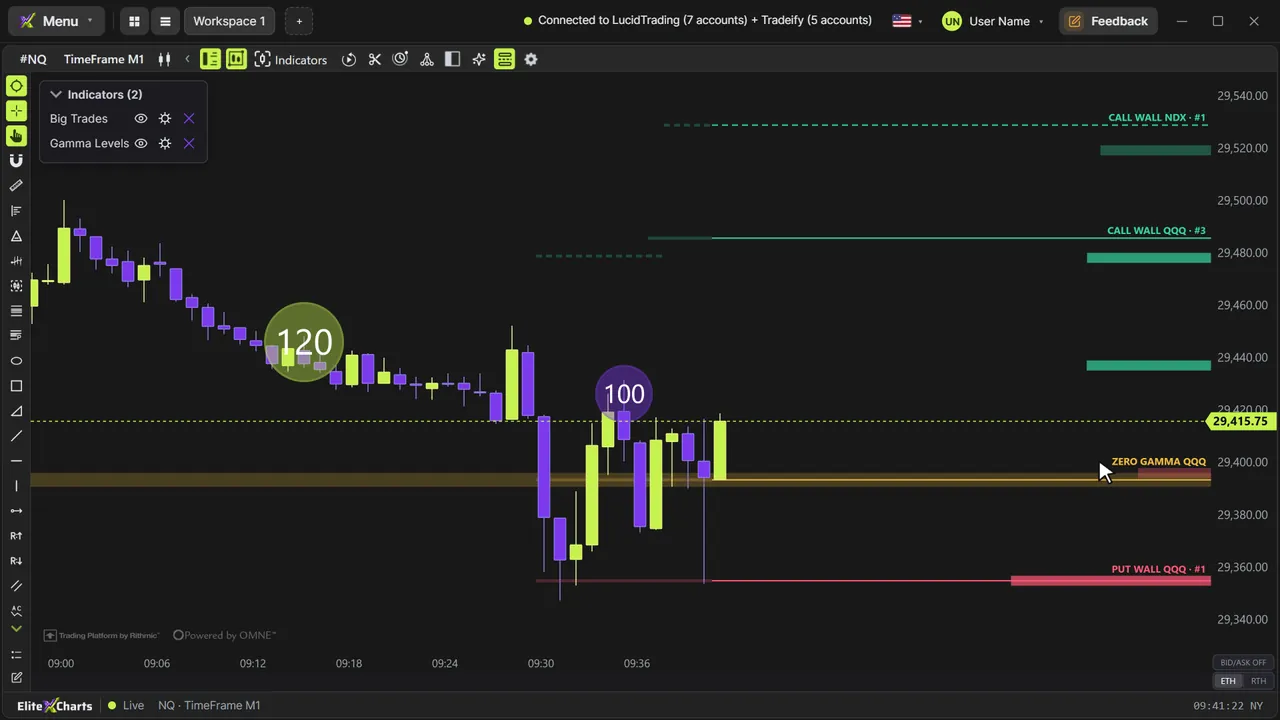
Real example in the platform
Gamma Levels on the NQ, 2-minute candles built from real ticks (October 6, 2026, Rithmic feed) — a screenshot of the platform itself, factory settings.
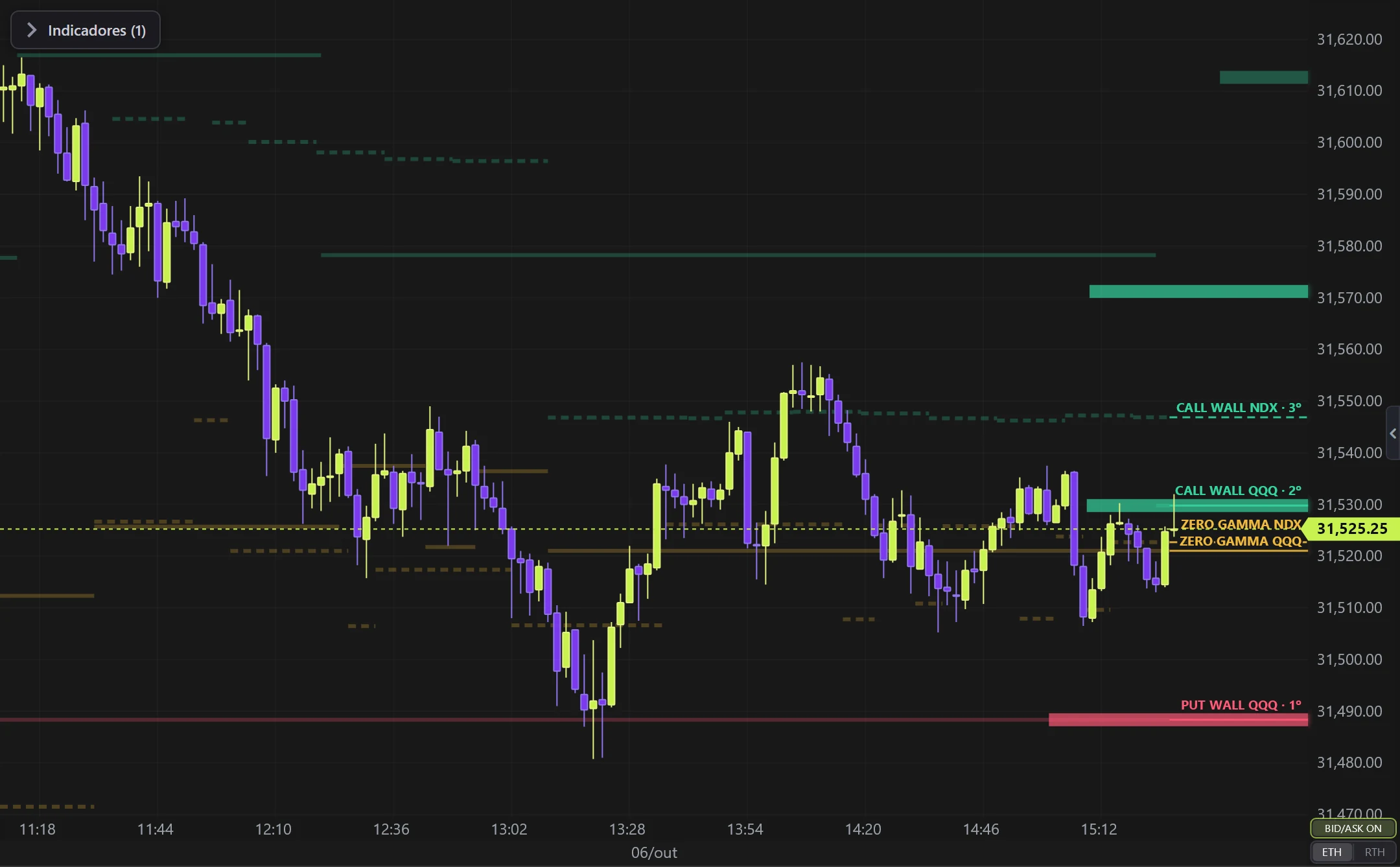
What it does
- Draws the three levels on NQ/MNQ/ES/MES, always behind the candles. The CURRENT level is the line that runs from the price scale to the latest candle; from the second candle back you see the trail, painted candle by candle, showing where each level was.
- Above each level: its name, chain and strike rank (CALL WALL QQQ · #2) — its position in the GEX of its own chain.
- The ETF chain (QQQ/SPY) is projected by the day's ratio; the index chain (NDX/SPX) already comes in futures points and is drawn dashed. Turn on one, the other or both.
- GEX profile by strike as bars coming out of the price scale, up to 200 px: green = positive gamma, red = negative; the top 3 stronger.
- In replay (from the replay bar or the ✂ scissors), the bars are the ones from the minute the replay is at — the same ones the live chart showed at that minute.
- The symbol comes from the chart itself; on other symbols the tool draws nothing.
- Updates by itself: every 20 seconds through the session.
- Only plots during the NY session (09:30–16:30 ET): before 09:30 the last level is the previous session's; after 16:30 there is no real data.
Options
- Chains (ETF and index), toggle and color per level, style (line and trail or dots per minute), width and opacity of the line and the trail, the level text (name and rank, with its text size), GEX profile (bar length, thickness and opacity), trail, previous days, forward projection and level-change confirmation.
- A new level only takes effect after holding N whole minutes (default 5) — until then the current level stays; the step is stamped at the confirming minute.
GexBot key
- Free with your own GexBot API key (Classic plan or higher): without the key, the click opens the card to connect it. The key stays on this computer only and the data goes from GexBot straight to the app.
- The app keeps on this computer the levels it has downloaded (every 20 s during the session) and, after 5:00 PM New York time, the whole day from GexBot's end-of-day report; on the Quant plan, also the last 90 days. Replaying a day shows that day's Gamma if it is stored.
Settings
Everything you can change in the indicator's settings dialog, in the same order as in the platform:
- Option chains
- ETF (QQQ / SPY, projected by ratio)
- Index (NDX / SPX)
- Levels
- Call Wall
- Color
- Put Wall
- Zero Gamma
- Style
- Line and trail
- Dots per minute
- Dot size (px)
- Lines
- Line width
- Line opacity (current level)
- Trail width (past levels)
- Trail opacity (past levels)
- Texts
- Level name above the bar
- Level text size
- Strike rank (#2, #3)
- GEX profile by strike
- Bars at the right edge
- Max length (px)
- Max thickness (px)
- Top 3 opacity
- Other bars opacity
- Intraday trail
- Show level changes
- Previous days of trail (weekdays)
- Forecast ahead (min)
- Confirm level change (min)
- Instrument
- Instrument (from chart)
How to add it in EliteXCharts
- Open a chart and click the Indicators icon in the chart header.
- Pick the Greek category and choose Gamma Levels.
- Click Add. Double-click the indicator (or use its gear) to open the settings.
- Or ask the AI Assistant: "add the Gamma Levels".
Frequently asked questions
What does the Gamma Levels indicator do?
Options GAMMA levels (Call Wall, Put Wall and Zero Gamma) projected onto the futures price — from the 0DTE chains of QQQ and NDX (NQ/MNQ) and SPY and SPX (ES/MES). Draws the three levels on NQ/MNQ/ES/MES, always behind the candles. The CURRENT level is the line that runs from the price scale to the latest candle; from the second candle back you see the trail, painted candle by candle, showing where each level was. Above each level: its name, chain and strike rank (CALL WALL QQQ · #2) — its position in the GEX of its own chain. The ETF chain (QQQ/SPY) is projected by the day's ratio; the index chain (NDX/SPX) already comes in futures points and is drawn dashed. Turn on one, the other or both.
How do you read the Gamma Levels?
Chains (ETF and index), toggle and color per level, style (line and trail or dots per minute), width and opacity of the line and the trail, the level text (name and rank, with its text size), GEX profile (bar length, thickness and opacity), trail, previous days, forward projection and level-change confirmation. A new level only takes effect after holding N whole minutes (default 5) — until then the current level stays; the step is stamped at the confirming minute.
How do I add the Gamma Levels to a chart in EliteXCharts?
Open a chart and click the Indicators icon in the chart header. Pick the Greek category and choose Gamma Levels. Click Add. Double-click the indicator (or use its gear) to open the settings. Or ask the AI Assistant: "add the Gamma Levels".
Try it on your own chart
Every feature on every plan — 6 months, 1 year or lifetime.
See plans & pricing